
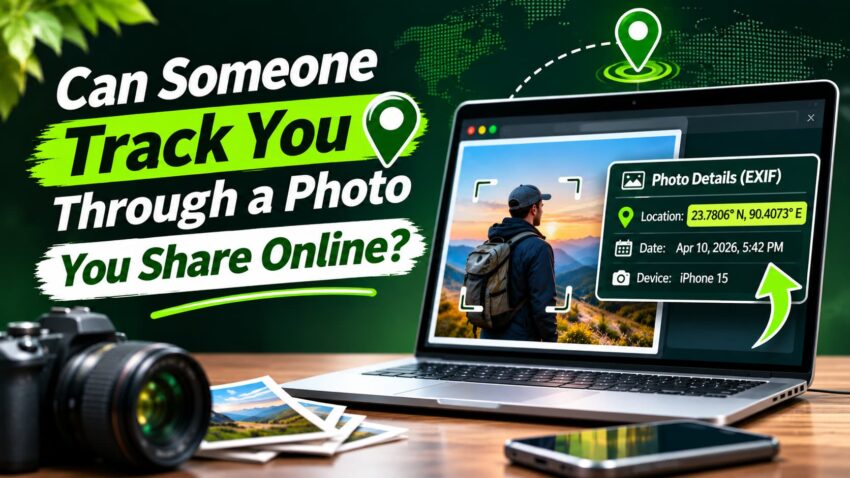
Could One Photo Reveal Where You Are?
Imagine sitting at your favorite coffee shop, enjoying your morning latte. You snap a quick picture, post it on Instagram, and go about your day.
Seems harmless, right?
But take another look at that photo. Maybe there’s a street sign in the background, a recognizable building across the road, or a location tag you didn’t even notice.
Those little details might reveal more about your whereabouts than you intended.
And it’s not just what people can see in a picture. Some photos also contain hidden information, including GPS coordinates that can reveal exactly where they were taken.
So, can someone track you through a photo you share online?
The answer is a little more complicated than you might think.
A photo can sometimes help someone figure out where you’ve been, but that doesn’t mean they can follow your every move in real time.
Let’s look at what your pictures might reveal and how you can protect your privacy.
Can Someone Really Find Your Location From a Photo?
Yes, it’s possible. And sometimes, people don’t need any special tools to figure out where a picture was taken.
Let’s say you post a photo of yourself standing outside your favorite neighborhood café. You don’t mention the location, but the café’s name is clearly visible behind you.
Someone familiar with the area might recognize it immediately. Others could search for the café online and find its address within seconds.
Photos can also contain something called location metadata, which may include GPS coordinates showing where the picture was taken. If that information remains in a shared photo file, someone with access to it might be able to identify the location.
But there’s an important difference between finding where a photo was taken and tracking someone’s current location.
An old vacation picture might reveal where you traveled last summer. Several photos from the same neighborhood could give someone clues about places you visit regularly.
Neither automatically tells them where you are right now.
That’s why understanding what your photos reveal matters, especially when you share pictures publicly.
What Information Can Be Hidden Inside a Photo?
When you take a picture with your phone, it doesn’t always save just the image. It may also store additional information about when, where, and how that picture was taken.
This information is called EXIF data, short for Exchangeable Image File Format.
Think of it as a collection of details attached to your photo that you wouldn’t normally notice just by looking at it.
Depending on your camera and settings, this information might include:
- The date and time the photo was taken.
- The phone or camera model used.
- Camera settings, such as exposure and shutter speed.
- GPS coordinates showing where the picture was taken.
That last one is especially important for privacy.
If your phone saves GPS coordinates with a photo, someone who receives the original image file may be able to view those coordinates and locate the spot on a map.
Apple’s official guide to managing location metadata in photos explains how location information is stored and how iPhone users can control it.
Does Every Photo Contain GPS Location Data?
No. Not every picture contains location information.
Whether GPS coordinates are saved depends on your device, camera settings, and location permissions.
For example, screenshots generally don’t contain camera GPS information. Edited pictures may also lose some metadata, depending on the app used.
Similarly, exporting or sharing a photo through certain apps can remove location details, while other methods may preserve them.
The important thing to remember is that you can’t tell whether a photo contains GPS data just by looking at it. Checking its information before sharing is always a smart habit.
How Can Someone Identify a Location Without GPS Data?
You might think removing GPS information from a photo is enough to keep your location private.
But here’s something many people overlook: the picture itself can reveal where it was taken.
Even without hidden location data, ordinary details in the background can give away more than you realize.
Street Signs, Buildings, and Landmarks
Imagine taking a selfie outside a restaurant. You haven’t tagged your location, but the restaurant’s name is visible behind you.
Anyone who recognizes the place might know exactly where you were.
The same goes for street signs, recognizable buildings, local businesses, or famous landmarks.
Even something as ordinary as a storefront can reveal a location if it’s distinctive enough.

Reflections and Small Background Details
Sometimes, the clues aren’t immediately obvious.
A reflection in a window or pair of sunglasses might show a nearby building or street.
Pictures taken at home can also accidentally reveal house numbers, apartment names, or recognizable views from a window.
These details might seem insignificant when you’re focused on the main subject of your photo.
But they’re still worth noticing before you post something publicly.
Reverse Image Search and Publicly Available Photos
Another thing to consider is whether the same picture, or a similar one, already exists online.
Reverse image search tools can sometimes find matching images that have been published elsewhere.
For example, a vacation photo featuring a recognizable hotel might resemble pictures already available on travel websites.
That doesn’t mean every photo can be traced to a specific address.
But it does mean removing GPS data isn’t the only thing you should think about before sharing a picture.
Do Facebook, Instagram, and Other Social Media Platforms Remove Photo Location Data?
Here’s some good news: posting a photo on social media doesn’t necessarily mean everyone can see where it was taken.
Major platforms like Facebook and Instagram generally remove GPS location information from the versions of photos other users can view or download.
So, if you upload a picture containing GPS coordinates, someone downloading it from your public profile typically won’t find those original coordinates attached.
But that doesn’t mean your location is completely hidden.
And photos aren’t the only source of location clues online. Websites may also learn your approximate location through your IP address and recognize your browser using other tracking methods. If you’re curious, we’ve explained how websites can track you after clearing your browsing history and what information they may still collect.
For example, if you tag a restaurant on Instagram, mention your neighborhood in a caption, or post a picture with a recognizable street sign, you’re still sharing clues about where you are.
And there’s another important difference: posting a photo online isn’t the same as sending someone the original image file.
If you send a picture directly through email, cloud storage, or certain messaging apps, the original metadata may remain intact.
Different platforms and sharing methods handle photo information differently, so it’s best not to assume every service automatically removes location details.
For example, Google’s guide to managing photo location information explains how location details are handled when pictures are shared through Google Photos.
The safest approach? Check your photo’s location information before sharing it, especially if you’re sending the original file to someone you don’t know well.
Can Someone Track Your Real-Time Location Through a Photo?
Here’s something worth clearing up: sharing a normal photo doesn’t automatically give someone access to your phone’s GPS or allow them to track your live location.
A picture isn’t a tracking device. Even if it contains GPS coordinates, those details usually show where the photo was taken, not where you are right now.
But there’s a catch.
Let’s say you’re having lunch at a restaurant and immediately post a picture with the location tagged. Someone who sees that post might reasonably guess you’re still there.
Now imagine regularly sharing photos from the same coffee shop, gym, or neighborhood park.
Over time, those posts could reveal patterns about the places you visit and when you’re usually there.
That still isn’t the same as someone watching your movements through your phone.
The real concern is how much information your photos reveal when combined with what you share publicly.
You don’t have to stop posting pictures. Just consider waiting until you’ve left a location before sharing them.
How to Check and Remove Location Data Before Sharing Photos
Before uploading a picture, it’s worth spending a few seconds checking whether it contains location information.
The good news? Both iPhones and Android phones offer simple ways to review these details.
Check Photo Location Information on iPhone
If you’re using an iPhone, you can check a picture’s location directly in the Photos app.
- Open the Photos app and select a picture.
- Swipe up on the photo or tap the information (ⓘ) button.
- Look for a map or location details beneath the picture.
If a location appears, your photo has saved location information.
To stop your camera from saving GPS data in future photos, go to Settings → Privacy & Security → Location Services → Camera and select Never.
Check Photo Location Information on Android
Android phones offer similar features, although the steps can vary depending on the manufacturer.
- Open Google Photos or your phone’s Gallery app.
- Select the picture you want to check.
- Swipe up or tap the three-dot menu to view its details.
- Look for location information or GPS coordinates.
Keep in mind that some photo apps may display estimated locations that aren’t actually embedded in the image file.
Remove Location Details Before Uploading or Sending
On an iPhone, open the photo, tap Share → Options, and turn off Location before sending it through a supported sharing method.
You can also follow Apple’s official photo-sharing instructions to review which information is included when sending pictures from your iPhone.
On Android, check your photo app’s sharing options for a setting to remove location information. Not every app offers this feature.
You can also disable camera location tagging through your phone’s app permissions.
One important tip: Sending an original photo through email or cloud storage may preserve its GPS metadata.
Since settings vary by device and app, always check the actual file before sharing sensitive pictures.
Simple Ways to Protect Your Privacy When Sharing Pictures
You don’t need to stop sharing your favorite moments online just because photos can reveal location details.
A few simple habits can help you enjoy social media without giving away more information than you intended.
Photos aren’t the only way personal information can be exposed online. Fake login pages and malicious software can also put your accounts at risk. Our guide on how hackers steal passwords without guessing them explains some of the most common methods and how to protect yourself.
Take a quick look at the background. Before posting a picture, check for street signs, house numbers, license plates, or anything that might reveal a specific location. Sometimes, the smallest details are the easiest to overlook.
Avoid sharing your location in real time. If you’re visiting a restaurant, attending an event, or enjoying a vacation, consider posting your pictures after you’ve left rather than while you’re still there.
Double-check location tags. Instagram, Facebook, and other platforms let you add locations to posts. Make sure you’re comfortable sharing that information before publishing.
Be mindful of personal places. Photos taken outside your home, workplace, or your child’s school deserve a little extra attention. You might accidentally reveal an address or a familiar daily routine.
Review who can see your pictures. Check your social media privacy settings and consider limiting personal posts to people you trust.
None of this means you should worry about every picture you take.
It’s simply about being a little more aware of what you’re sharing.
So, Can Someone Track You Through a Photo?
The short answer is yes, a photo can sometimes reveal where you’ve been, but that doesn’t mean someone can automatically track your current location.
GPS metadata, recognizable landmarks, and small background details can all provide clues about where a picture was taken.
Fortunately, protecting your privacy doesn’t have to be complicated.
Before sharing a photo, take a moment to check its location information, look at what’s visible in the background, and think about who might see it.
You don’t have to stop sharing your favorite moments online. Just make sure your pictures aren’t revealing more than you intended.