
You’re trying to visit a website, buy something online, or simply search for information on Google. Suddenly, you’re asked to select images of traffic lights, check a box, or wait while the website verifies your browser.
It’s a familiar experience, but it can be frustrating, especially when you’re in a hurry.
So, why do websites ask you to prove you’re human?
These security checks help websites distinguish real visitors from automated programs that can spread spam, commit fraud, or disrupt online services.
But why do ordinary users sometimes trigger these checks? In this guide, we’ll explain how human verification works, what causes it, and how to reduce unnecessary interruptions without sacrificing your online privacy.
Why Do Websites Ask You to Prove You’re Human?
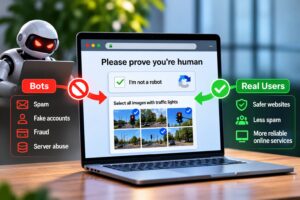
Websites ask you to prove you’re human because not every visitor is a real person. A significant amount of internet traffic comes from automated programs known as bots. While some bots perform useful tasks, others are designed to exploit websites, steal information, or interfere with online services.
Human verification helps websites identify potentially harmful automated activity before it causes problems.
Protecting Websites From Automated Bots
Malicious bots can perform thousands of actions in a short amount of time. They may attempt to collect website content without permission, create fake accounts, or overwhelm servers with excessive requests.
By introducing verification checks, websites can make automated abuse more difficult while allowing legitimate visitors to continue browsing.
Preventing Spam, Fraud, and Online Abuse
Have you ever noticed suspicious comments, fake reviews, or spam messages on a website? Automated bots are often responsible for this type of activity.
Human verification helps reduce these problems and can also make automated login attempts using stolen passwords less effective.
Although these checks can sometimes interrupt your browsing experience, they play an important role in keeping online services safer and more reliable.
What Is a CAPTCHA and How Does It Work?
CAPTCHA stands for Completely Automated Public Turing test to tell Computers and Humans Apart. It’s a security mechanism designed to help websites distinguish human visitors from automated programs.
While older CAPTCHAs required users to complete simple challenges, modern verification systems often work quietly in the background.
Traditional Text and Image-Based CAPTCHAs
You’ve probably encountered a CAPTCHA that asks you to type distorted letters or select images containing traffic lights, bicycles, or crosswalks.
These challenges are designed to be relatively easy for humans but more difficult for automated programs. Google’s reCAPTCHA is one of the most widely recognized examples of this technology.
Invisible CAPTCHAs and Behavioral Analysis
Modern verification systems don’t always require you to solve a puzzle. Instead, they may analyze browser information, interaction patterns, and other signals to assess whether a visitor is likely human.
If the system detects potentially suspicious activity, it may present an additional verification challenge.
Cloudflare and Modern Browser Verification
Cloudflare Turnstile takes a different approach by using browser-based checks and other signals to assess visitors, often without requiring them to solve visual puzzles. According to Cloudflare’s official Turnstile overview, this technology helps prevent automated abuse without requiring visitors to complete traditional visual puzzles.
The goal is to prevent automated abuse while making the browsing experience smoother and less disruptive for legitimate users.
Why Do Websites Sometimes Think You’re a Bot?
Getting asked to prove you’re human doesn’t necessarily mean you’ve done anything suspicious. Website security systems rely on various signals to identify automated traffic, and sometimes ordinary browsing activities can trigger those same warning signs.
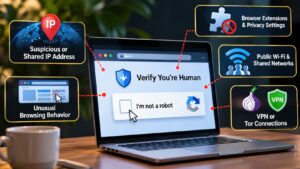
Suspicious or Shared IP Addresses
Websites often evaluate the reputation of your IP address before allowing access. If an IP address has previously been associated with spam, automated traffic, or suspicious activity, visitors using that address may face additional verification.
Since multiple people can share a public IP address, someone else’s online activity could affect your browsing experience. Your IP address can also help websites estimate your approximate location, which explains why websites know your location even when GPS is off?
Unusual Browsing Behavior
Opening several pages quickly, repeatedly refreshing a website, or performing numerous searches within a short period can resemble automated activity.
Even if you’re simply researching a topic or comparing products across multiple pages, a website’s security system might interpret your behavior as unusual.
Browser Extensions and Privacy Settings
Certain ad blockers, anti-tracking extensions, and strict browser privacy settings can interfere with the scripts websites use to verify visitors.
When a verification system cannot collect enough information to assess your connection, it may ask you to complete an additional security check.
Public Wi-Fi and Shared Networks
Public Wi-Fi networks at airports, hotels, coffee shops, and universities often allow many users to access the internet through shared public IP addresses.
If suspicious activity originates from one of these addresses, other people using the same network may encounter CAPTCHA challenges.
In most cases, these checks are simply a precaution rather than an indication that you’ve done something wrong.
Why Do VPN and Tor Users Get More CAPTCHA Checks?
If you’ve ever browsed with a VPN or Tor Browser, you may have noticed that some websites ask you to prove you’re human more frequently. This usually has more to do with how your connection appears to websites than what you’re actually doing online.
Shared IP Addresses and IP Reputation
VPN services and Tor exit relays allow multiple users to access websites through the same public IP address.
If some of those users engage in spamming or other automated activities, the shared IP address may develop a poor reputation. As a result, legitimate users connecting through that address may encounter additional security checks.
How Websites Identify VPN and Tor Connections
Websites can use IP reputation databases and publicly available Tor exit relay information to recognize connections associated with privacy tools.
Some websites automatically apply stricter verification requirements to these connections. Despite these additional security checks, there are legitimate reasons to use privacy-focused tools, including why journalists and whistleblowers use the Tor network to protect their identities and confidential communications.
Encountering more CAPTCHAs doesn’t mean you’re doing anything wrong. It’s often a consequence of how websites manage potentially risky traffic.
Do CAPTCHA Checks Collect Your Personal Information?
CAPTCHA systems do more than determine whether you’re human. Depending on the verification provider, they may also collect certain information about your browser, device, and online behavior to assess whether your connection appears legitimate.
What Information Verification Systems May Collect
Some CAPTCHA services may collect information such as your IP address, browser type, operating system, cookies, and interaction patterns.
They may also analyze how you interact with a webpage, including mouse movements and other behavioral signals.
However, not every verification system collects the same information. Data collection practices vary depending on the provider, its technology, and its privacy policy.
The Balance Between Security and Online Privacy
While collecting certain information helps websites detect automated abuse, it can also raise legitimate privacy concerns.
Some modern verification systems aim to minimize unnecessary data collection while maintaining effective security.
If you’re concerned about your privacy, reviewing the verification provider’s privacy policy can help you understand what information may be collected and how it’s used.

How to Reduce Unnecessary Human Verification Checks
Although you can’t completely avoid CAPTCHA challenges, a few simple changes can help reduce how often you encounter them without compromising your online privacy or security.
Keep Your Browser Updated
Outdated browsers may have compatibility issues with modern verification systems. Keeping your browser updated helps ensure that security checks function correctly while protecting your device against known vulnerabilities.
Review Your Browser Extensions and Settings
Some browser extensions can interfere with verification scripts, causing repeated CAPTCHA challenges.
If you’re experiencing problems, review your installed extensions and check whether they’re affecting a particular website. Avoid disabling important privacy protections across all websites simply to complete a verification check.
Check Your Internet Connection
If you’re repeatedly encountering CAPTCHAs on public Wi-Fi, try switching to a trusted private network or your mobile data connection.
Shared networks sometimes have poor IP reputations because of activity from other users.
Use Trusted VPN Services
Some VPN servers may trigger more verification checks than others, particularly when their IP addresses have been associated with automated abuse.
Choose a reputable VPN provider that maintains reliable servers and strong privacy standards.
Remember, occasional CAPTCHA challenges are normal. The goal isn’t to bypass website security measures but to reduce unnecessary interruptions while maintaining a safe browsing experience.
Frequently Asked Questions
Why Does Google Keep Asking Me to Verify I’m Human?
Google may detect unusual traffic from your network, such as repeated searches, automated requests, or activity associated with a shared IP address. This doesn’t necessarily mean you’ve done anything wrong. Google’s guide to unusual traffic and verification checks explains why these messages appear and what you can do if they keep occurring.
Does Incognito Mode Trigger More CAPTCHAs?
Sometimes. Incognito mode starts without your existing browsing cookies, which may make it harder for certain verification systems to recognize returning visitors.
Are CAPTCHA Checks Safe?
Legitimate CAPTCHA checks are generally safe. However, be cautious of fake verification pages that ask you to download software, run commands, or provide sensitive personal information.
Why Do I Keep Getting CAPTCHAs Even After Completing Them?
Repeated CAPTCHAs may result from browser compatibility issues, blocked cookies, unstable internet connections, or poor IP address reputation.
Can a Website Verify That I’m Human Without a CAPTCHA?
Yes. Modern verification systems can analyze browser information, connection details, and behavioral signals in the background, often without requiring you to complete a visible challenge.
Human Verification Is About More Than Just Security
Being asked to prove you’re human can be frustrating, especially when you’re simply trying to browse the internet. However, these checks play an important role in preventing automated abuse, reducing fraud, and keeping online services reliable.
As technology evolves, verification systems are becoming less intrusive, allowing more visitors to browse without completing complicated challenges.
Understanding why these checks appear can make them a little less frustrating. By keeping your browser updated, using trusted privacy tools, and practicing safe browsing habits, you can enjoy a smoother online experience without compromising your security.