
How Can Someone Steal Your Password Without Knowing It?
Imagine waking up to an email saying someone just logged into your account from a device you don’t recognize.
You check your password. It’s long, complicated, and something you’ve never shared with anyone. So how did someone manage to get into your account?
Here’s what might surprise you: hackers don’t always need to guess your password to steal it.
Sometimes, all it takes is clicking a convincing link, downloading the wrong file, or using a website that has suffered a data breach.
And in some cases, attackers can even gain access to your account without knowing your password at all.
Understanding how hackers steal passwords is important because even a strong password can’t protect you from every type of attack.
The good news? Many of these threats are preventable once you know what to watch out for.
Let’s look at how these attacks actually happen and what you can do to protect yourself.
Why Strong Passwords Can Still Be Stolen
You’ve probably heard the advice to create strong passwords using a mix of letters, numbers, and special characters. And while that’s good advice, there’s something important to understand.
A strong password makes it harder for someone to guess their way into your account, but it doesn’t make your password impossible to steal.
Think about it this way. You could have a password that’s 20 characters long, but if you enter it on a fake login page that looks exactly like your bank’s website, you’ve just handed it over to a scammer.
The same thing can happen if your device gets infected with malware designed to capture sensitive information.
And sometimes, the problem isn’t even on your end.
If a website you’ve used suffers a data breach, your login credentials could be exposed. If you’ve reused that password elsewhere, those accounts might also be at risk.
That’s why password security isn’t just about creating something difficult to guess.
It’s also about where you enter your password, how you store it, and whether you’re using it on more than one account.
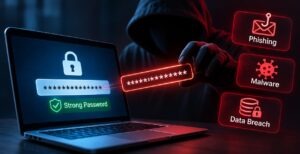
Common Ways Hackers Steal Passwords
You don’t have to visit a suspicious website or download something unusual to put your passwords at risk. Sometimes, everyday online activities can expose your login information without you realizing it.
Here are five common methods attackers use to steal passwords or gain access to accounts.
1. Phishing Emails and Fake Login Pages
Imagine getting an email that appears to come from Netflix, Amazon, or your bank. It says there’s a problem with your account and asks you to verify your information immediately.
You click the link, enter your password, and everything looks normal.
Except the website wasn’t real.
This is called phishing, and it’s one of the most common ways criminals trick people into revealing their login credentials.
These fake websites can look surprisingly convincing, sometimes copying the logos, colors, and layouts of legitimate services.
Fake websites aren’t limited to the regular internet, either. On the dark web, outdated onion addresses and imitation websites can create additional confusion. Our guide to why dark web links go offline explains how abandoned addresses and copycat sites can remain in circulation.
The safest approach is to avoid signing in through unexpected email links. Instead, open the official website or app directly.
2. Passwords Exposed in Data Breaches
Sometimes, your password can be compromised even when you’ve done nothing wrong.
Companies store account information in databases, and those systems can become targets for cybercriminals.
If attackers gain access, they may steal email addresses, usernames, password hashes, or other sensitive information.
Stolen information can also circulate through less visible parts of the internet, including dark web communities. Unlike ordinary websites, many onion services aren’t indexed by Google or Bing. Our article on why search engines cannot index most dark web websites explains why these sites are difficult for traditional search engines to discover.
Passwords are often stored in hashed form rather than plain text. However, weak passwords and poorly protected password databases can still put users at risk.
This is why using a unique password for every account matters. A breach at one company shouldn’t automatically put your other accounts in danger.
3. Malware and Keyloggers
Malware is malicious software designed to interfere with devices, steal information, or perform other harmful activities.
Some types of malware can capture passwords saved in browsers, while others may record what you type.
A keylogger, for example, can monitor keyboard input and potentially capture login credentials.
These threats may arrive through infected downloads, deceptive attachments, or software from untrustworthy sources.
Keeping your operating system updated and avoiding suspicious downloads can significantly reduce your exposure to these risks.
4. Malicious Browser Extensions
Browser extensions can make everyday tasks easier, from checking grammar to managing passwords.
But not every extension deserves your trust.
Some extensions request permission to read information on the websites you visit. In the wrong hands, those permissions could expose browsing activity or sensitive data.
A malicious extension might also redirect you to fake websites or interfere with legitimate login pages.
Before installing an extension, check its developer, permissions, and reputation. Remove extensions you no longer need.
5. Password Reuse and Credential Stuffing
Let’s say you use the same email address and password for an online shopping account and your personal email.
If the shopping website suffers a data breach, attackers may try those stolen credentials on other popular services.
This is known as credential stuffing.
Instead of guessing your password, attackers are testing login information that has already been exposed.
And if you’ve reused the same password across multiple accounts, one compromised service could create problems elsewhere.
That’s why unique passwords are so important, even for accounts that don’t seem particularly valuable.
The bottom line: Hackers don’t always need sophisticated techniques to steal passwords. Often, they take advantage of stolen information, deceptive messages, unsafe software, or simple mistakes that anyone could make.
Can Hackers Access Your Account Without Your Password?
Surprisingly, yes. In some situations, hackers can access an online account without ever knowing the password.
When you log into a website, it often creates something called a session cookie. Think of it as a temporary digital pass that tells the website you’ve already signed in.
That’s why you don’t have to enter your password every time you open a new page or return to a website.
But what happens if someone steals that digital pass?
This is where session hijacking comes in.
Certain types of malware can steal session cookies from your browser. If an attacker obtains a valid session cookie and the website accepts it, they may be able to access your account without entering your password or completing another login verification.
In some cases, this can even bypass the usual two-factor authentication process because the session has already been authenticated.
The important difference is that the attacker hasn’t necessarily stolen your password. They’ve stolen access to an account you’re already logged into.
That’s why protecting your device, avoiding suspicious downloads, and reviewing unfamiliar login sessions are just as important as having a strong password.
How Do You Know If Your Password Has Been Stolen?
One of the tricky things about password theft is that you might not notice anything unusual right away.
Someone could have your login credentials without actually using them yet. But there are a few warning signs worth paying attention to.
Unexpected login alerts: If you receive an email or notification about a login from an unfamiliar device or location, don’t ignore it. Check your account’s recent activity to see whether the login was legitimate.
Password reset emails you didn’t request: Getting a random password reset email doesn’t automatically mean your account has been hacked. However, repeated requests or notifications about a password change you didn’t make could indicate suspicious activity.
Unfamiliar account activity: Messages you never sent, purchases you didn’t make, or changes to your account settings can all suggest someone else has gained access.
Data breach notifications: Sometimes, companies notify customers when their information may have been exposed in a security incident. You can also use services like Have I Been Pwned to check whether your email address appears in known data breaches.
But here’s something important to remember: not every stolen password comes with a warning sign.
Some attackers may hold onto stolen credentials for weeks or months before attempting to use them.
That’s why it’s worth checking your account security settings occasionally, even when everything seems perfectly normal.
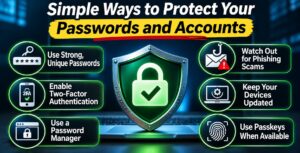
Simple Ways to Protect Your Passwords and Accounts
The good news is that protecting your online accounts doesn’t have to be complicated. You don’t need expensive security software or advanced technical knowledge to make a real difference.
A few simple habits can help keep your personal information safer.
1. Use a Different Password for Every Account
Using the same password everywhere might be convenient, but it’s also risky.
If one website suffers a data breach, attackers could try your stolen password on other services.
Create a unique password for each important account, especially your email, banking, and social media accounts. Longer, randomly generated passwords are generally harder to guess.
2. Consider Using a Password Manager
Remembering dozens of complicated passwords isn’t realistic for most people.
That’s where a password manager can help.
It securely stores your login credentials and can generate strong, unique passwords whenever you create a new account.
You only need to remember your main password, which should be strong and protected with multi-factor authentication whenever possible.
3. Turn On Multi-Factor Authentication
Multi-factor authentication (MFA) adds another layer of protection beyond your password.
For example, after entering your password, you might need to approve a notification or enter a code from an authenticator app.
Even if someone steals your password, this additional step can make accessing your account much harder.
Whenever available, consider phishing-resistant options such as security keys.
4. Use Passkeys When Available
Passkeys are becoming a popular alternative to traditional passwords.
Instead of typing a password, you can often sign in using your device’s fingerprint, face recognition, or screen lock.
According to the FIDO Alliance, passkeys are designed to resist phishing because they’re tied to the legitimate website or app.
If a service offers passkeys, they’re worth considering.
5. Be Careful With Unexpected Login Links
Not every email asking you to verify your account is legitimate.
Scammers often create messages that look like they’re from trusted companies.
If you receive an unexpected login or security alert, avoid clicking the link inside the message.
Instead, open the company’s official website or app directly and check your account.
6. Keep Your Devices and Browsers Updated
Software updates do more than introduce new features.
They often fix security vulnerabilities that attackers could exploit to steal information.
Enable automatic updates whenever possible, and avoid installing software or browser extensions from unfamiliar sources.
Remember, good password security isn’t about doing one thing perfectly. It’s about combining several simple habits that make your accounts harder to compromise.
What Should You Do If Your Password Is Already Compromised?
If you discover that someone may have stolen your password, the most important thing is to act quickly without panicking.
Start by changing your password immediately. Use a trusted device, especially if you suspect your computer or phone might be infected with malware. Choose a new, unique password that you haven’t used anywhere else.
Next, check your email account. Since email is often used to reset passwords for other services, securing it should be a priority. Change its password if necessary and enable multi-factor authentication.
Here are a few other steps worth taking:
- Sign out of unfamiliar sessions: Most major services let you review devices currently logged into your account. Remove anything you don’t recognize, and use the option to sign out of all sessions if available.
- Review your recovery information: Make sure your recovery email address, phone number, and security settings haven’t been changed without your permission.
- Check for suspicious activity: Look for unfamiliar messages, purchases, or changes to your account.
- Contact the service: If you can no longer access your account, use the company’s official account recovery process.
If you suspect malware caused the problem, scan and secure the affected device before signing in again.
And remember, if you’ve reused the compromised password on other websites, change it on those accounts too.
Keeping Your Accounts Safe Starts With Better Habits
Password theft isn’t always about someone figuring out a complicated combination of letters and numbers. Sometimes, attackers simply take advantage of fake websites, stolen databases, unsafe downloads, or reused passwords.
The good news is that many of these risks can be reduced with a few everyday precautions.
Using unique passwords, enabling multi-factor authentication, keeping your devices updated, and being careful with unexpected links can make a meaningful difference.
You don’t have to become a cybersecurity expert to protect yourself online.
The goal isn’t to make your accounts impossible to hack. It’s to make them much harder to compromise while knowing what to do if something goes wrong.
Keeping Your Accounts Safe Starts With Better Habits
A strong password is an important part of online security, but it can’t protect you from every threat. As we’ve seen, hackers can steal passwords through phishing scams, data breaches, malware, and other methods that don’t involve guessing them.
The good news is that a few simple habits can make a real difference.
Using unique passwords, recognizing suspicious messages, enabling multi-factor authentication, and keeping your devices updated can significantly reduce your risk.
You don’t need to understand every hacking technique to stay safer online.
What matters most is knowing the common risks, taking sensible precautions, and staying alert when something doesn’t seem right.